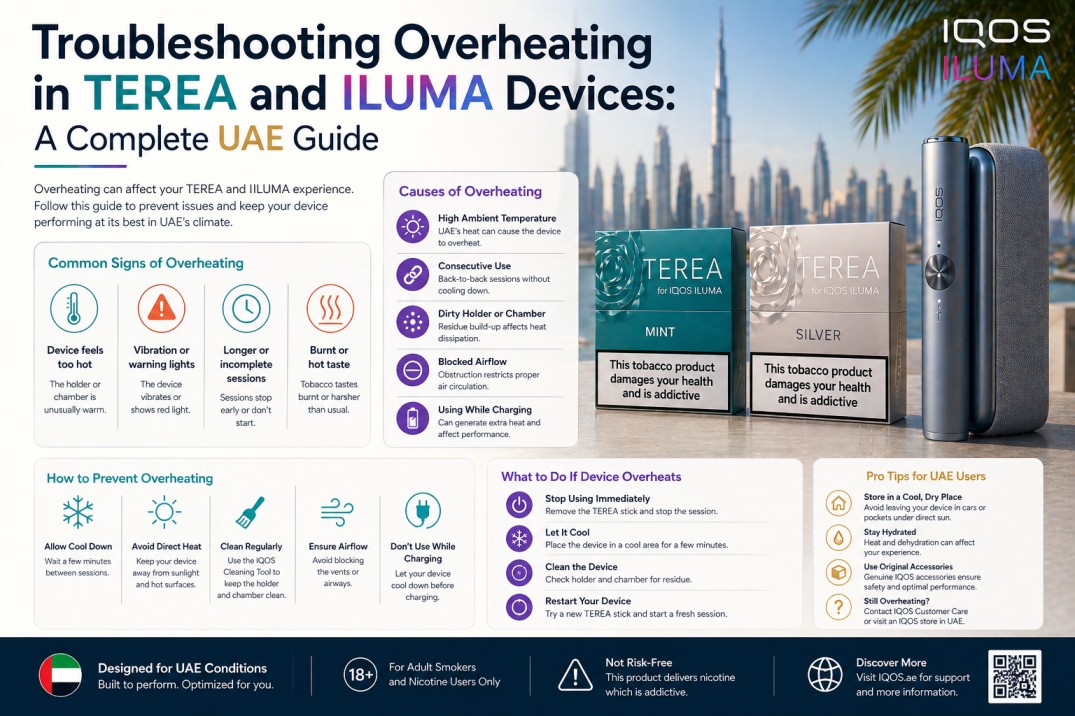
If your IQOS ILUMA or ILUMA i device is getting too hot, shutting off mid-session, or showing two white blinks followed by the device going dark, the cause is almost always one of four things: back-to-back sessions without breaks, exposure to UAE summer heat, a third-party charging cable generating excess heat during charging, or a firmware issue that has not been updated. In most cases, moving the device to a cool indoor space for 15 minutes and allowing it to reach normal temperature fully resolves the problem.
For users across Dubai, Sharjah, Abu Dhabi, and the wider UAE, overheating is the most climate-specific problem the ILUMA device faces. Car interiors reach 70 degrees Celsius in July. Office-to-outdoor temperature swings of 20 degrees or more happen multiple times a day. And many users run multiple sessions back to back during long commutes or social settings without realising the device needs time to recover between uses.
This guide covers every cause of ILUMA overheating, every fix in the correct order to try them, and a complete prevention plan built for UAE conditions. It applies to all ILUMA and ILUMA i models: ILUMA i Standard, ILUMA i Prime, ILUMA i ONE, and the older ILUMA Standard, ILUMA Prime, and ILUMA One.
For adult tobacco users only. Contains nicotine, which is addictive. Not for sale to minors.
Why the ILUMA Gets Hot: Understanding the Normal vs the Problem
Before jumping into fixes, it helps to understand what heat is normal and what heat signals a problem.
The IQOS ILUMA generates heat during every session. It uses an electromagnetic induction field to activate the susceptor inside each TEREA stick, heating the tobacco to approximately 350 degrees Celsius. That process generates heat inside the holder. A warm holder after a session is expected. A device that is too hot to hold comfortably, shuts off mid-session, or shows warning light signals is not.
Normal Heat vs Problem Heat
Normal: The holder feels warm to the touch after a session. This happens after every use and is expected. The device cools on its own within 2 to 3 minutes.
Normal: The device feels slightly warmer after 3 or 4 consecutive sessions. Heat accumulates slightly with repeated use, especially in ambient UAE temperatures.
Problem: The device shuts off during a session and shows two white blinks. This is the thermal protection system activating. The device has detected internal temperature above its safe operating range and has locked itself to prevent damage.
Problem: The device feels hot to the touch even before you insert a TEREA stick. This means external heat from the environment has already pushed the device above its comfortable range before any session starts.
Problem: The device consistently overheats on the first or second session of the day, even after a full overnight cool-down. This may indicate battery degradation or a firmware issue rather than environmental heat.
Understanding which category you are in guides which fix to apply first.
The 6 Root Causes of ILUMA Overheating in UAE
Cause 1: Back-to-Back Sessions Without Breaks
This is the most common cause of ILUMA overheating across the UAE. Running 3, 4, or 5 TEREA sessions in a row without giving the device time to cool puts continuous thermal stress on the battery and the induction system.
Each session heats the internal components. With no recovery time between sessions, heat accumulates faster than the device can dissipate it. The thermal protection system eventually activates and shuts the device down.
Many UAE users encounter this during long social gatherings, evening family events, or extended commutes where they use the device repeatedly over a short period. The issue is not the device failing. It is the pace of use outrunning the device’s ability to manage its own heat.
The fix: Allow 2 to 3 minutes between sessions. This gives the holder enough time to release accumulated heat before the next session starts.
Cause 2: UAE Summer Heat Exposure
Dubai, Sharjah, Abu Dhabi, and the wider UAE experience summer temperatures that regularly exceed 45 degrees Celsius outdoors. Car interiors left in direct sun reach 60 to 70 degrees or more within minutes. A device sitting on a car dashboard in UAE July heat can reach temperatures above its safe operating limit before a single session begins.
The ILUMA’s safe operating range is 0 to 50 degrees Celsius. An ambient environment above that range means the device is already stressed before the induction heating begins its own heat generation. The thermal protection activates faster, sessions end earlier, and the white blink shutdown signal appears after fewer consecutive uses than it would in cooler conditions.
This is not a device fault. It is a design safety feature responding correctly to an environment it was not built to handle without user management.
The fix: Keep the device in a bag, an air-conditioned car interior, or a shaded location when not in use. Never leave it on a car dashboard, window ledge, or anywhere in direct UAE sunlight.
Cause 3: Charging While the Device Is Hot
Placing a warm holder into the pocket charger immediately after a session, or plugging in the USB-C cable while the device is still hot from outdoor use, generates additional heat during the charging process.
Lithium-ion batteries are sensitive to heat during charging. Charging a hot battery causes the charging circuit to generate more heat than a cool battery would, which can push an already warm device into the thermal protection zone. Over repeated instances, charging a hot battery also accelerates long-term battery capacity loss.
The fix: Let the holder cool for 2 to 3 minutes before placing it in the pocket charger. If the device has been in UAE outdoor heat, let it cool in air-conditioning for at least 10 minutes before connecting it to the charger.
Cause 4: Third-Party Charging Cables and Adapters
Non-IQOS charging cables and adapters frequently deliver inconsistent or unstable power to the ILUMA device. This inconsistency causes the device’s charging circuit to work harder to regulate the incoming power, which generates excess heat during charging.
In the UAE market, third-party USB-C cables and multi-port chargers are commonly used alongside ILUMA devices out of convenience. Many of these deliver what is described as dirty power, meaning voltage that fluctuates outside the narrow range the device expects. This does not just cause overheating during charging. Over time, it damages the battery management system and can cause the device to report overheating errors even during normal sessions.
The fix: Use only the original IQOS charging cable and adapter that came with the device. If that cable is lost or damaged, replace it with a genuine IQOS cable. A high-quality branded USB-C cable rated for the correct output is an acceptable alternative.
Cause 5: Dust and Debris Blocking Ventilation
The ILUMA and ILUMA i devices have small air vents that allow internal heat to dissipate during and after sessions. In the UAE, particularly during March to May when seasonal winds carry fine dust and sand particles, these vents can become partially blocked by debris.
A blocked vent reduces the device’s ability to dissipate internal heat. Sessions that would normally end without triggering thermal protection start triggering it because the heat has nowhere to go. This is more common in the ILUMA i ONE model because its single-unit design has fewer separate heat dissipation surfaces than the two-piece Standard and Prime models.
The fix: Inspect the device exterior weekly. Use a dry, soft-bristled brush to gently clear any visible dust from around the vent openings and the holder port. Do not blow air into the device using your mouth, as moisture from breath can damage internal components.
Cause 6: Outdated Firmware
IQOS releases firmware updates that improve the device’s heat management algorithms, battery regulation, and session monitoring. Running outdated firmware means running with older heat management logic that may not be as efficient as the current version.
Users who have not updated their firmware in several months sometimes report overheating that resolves after a firmware update, even when nothing else about their use habits or environment changed. This is because the update improves how the device manages its heating cycle and battery output.
The fix: Open the IQOS app on your phone, connect the device via Bluetooth, and check for available updates. Install any update with at least 50 percent battery charge and do not interrupt the process. After the update, perform a 10-second reset by holding the pocket charger button until the lights blink.
Step-by-Step Fix: What to Do When Your ILUMA Overheats Right Now
Follow these steps in order. Stop when the problem resolves.
Step 1: Stop the Session and Remove the TEREA Stick
Do not force another session immediately after the device shuts down from heat. Remove the used TEREA stick and set the device on a flat surface in an air-conditioned room. Do not put it back in a bag or pocket yet, as trapped heat will take longer to dissipate.
Step 2: Cool the Device Naturally for 15 Minutes
Allow the device to cool at room temperature in an air-conditioned space for a minimum of 15 minutes. Do not place the device in a refrigerator, freezer, or near an ice pack. Rapid temperature drops cause condensation to form inside the device on its electronic components. This condensation can cause short circuits or corrosion that are far more damaging than the original overheating event.
Cool naturally, in air-conditioning, on a flat surface. That is the only safe cooling method.
Step 3: Perform a 10-Second Reset
After the device has cooled, hold the button on the pocket charger for 10 seconds until the lights blink and then go out. Release the button. This clears any temporary error state caused by the thermal protection activation and allows the device to restart with a clean operating status.
A 10-second reset resolves the majority of post-overheating errors without any further action needed.
Step 4: Insert a Fresh TEREA Stick and Test One Session
Insert one fresh TEREA stick from a sealed, correctly stored pack and run a single session. Monitor whether the session completes normally (14 puffs or 6 minutes) or triggers the thermal shutdown again.
If the session completes normally, the overheating was caused by environmental heat or back-to-back session pace, and the problem is resolved.
If the session triggers thermal shutdown again after fully cooling the device, proceed to Step 5.
Step 5: Check the Charging Cable and Port
Disconnect the device from any non-IQOS charger. Inspect the USB-C port for visible dust or debris. Use a dry, soft brush to clear the port gently. Switch to the original IQOS charging cable and plug directly into a wall socket.
Allow the device to charge to 100 percent before testing another session. Charging-related heat issues often resolve immediately when the correct cable is used.
Step 6: Update Firmware Through the IQOS App
Open the IQOS app, connect the device via Bluetooth, and check the firmware version. If an update is available, install it immediately with at least 50 percent battery charge. After the update completes, run another session and check whether overheating continues.
Step 7: Contact Support If the Problem Continues
If the device continues to overheat after completing all six steps above, the issue is not environmental or software-related. Contact iqostereazone.ae via WhatsApp for guidance. Have the device model name (ILUMA i Standard, ONE, or Prime), the specific light pattern you see during overheating, and a description of when the problem started before reaching out.
ILUMA Overheating Signal Reference: What Each Light Pattern Means
| Light Pattern | What It Means | Immediate Action |
| Two white blinks, device off | Thermal protection activated, device too hot | Cool 15 minutes, then 10-second reset |
| Rapid white blinking during session | Temperature rising, approaching limit | Finish session slowly, allow longer break after |
| Red light after overheating | Error state from thermal shutdown | 10-second reset after cooling |
| Device warm but no light signals | Normal session heat | No action needed, allow 2 to 3 minutes before next session |
| Device hot before any session | Environmental heat, not device-generated | Move to cool space, wait 15 minutes before first session |
| Repeating two white blinks on every session | Possible battery degradation or firmware issue | Update firmware, contact support if it continues |
UAE-Specific Overheating Scenarios and How to Handle Each
Scenario 1: ILUMA Overheating in a Car in Dubai Summer
Your device was in the car while you were at work or shopping. You return, pick it up, insert a TEREA stick, and the device immediately shuts down with two white blinks.
This is the most commonly reported overheating scenario across Dubai, Sharjah, and Abu Dhabi. The device has been sitting in 60 to 70 degree car-interior heat and is already at or above its thermal limit before any session begins.
Do not attempt to use the device immediately. Bring it inside to an air-conditioned space and leave it on a flat surface for 15 to 20 minutes. Do not put it in the car’s air-conditioned vent output, as the cold air is too direct and rapid. Natural cool-down in room temperature air-conditioning is the correct approach.
After 15 to 20 minutes, perform a 10-second reset and test one session.
Prevention: Never leave your ILUMA device in a parked car during UAE summer. This single habit eliminates the most common overheating scenario reported in the UAE.
Scenario 2: Overheating During Back-to-Back Sessions at a Social Gathering
You are using the device repeatedly during an evening social event in Dubai Marina or a family gathering in Jumeirah. After 4 or 5 consecutive sessions, the device shuts off with two white blinks.
This is back-to-back thermal accumulation. The device is functioning correctly. Its thermal protection is working as designed.
Allow 3 to 5 minutes between each session during periods of heavy use. In outdoor settings where ambient temperatures are higher, extend that gap to 5 minutes. The device will resume normal function once it has had enough time to release accumulated heat.
Scenario 3: Overheating Only When Charging
The device gets very warm and shuts off the charging cycle before reaching full charge. This is almost always a cable or power source issue.
Switch to the original IQOS cable and a wall socket. Do not charge from a laptop port, a low-output USB hub, or an unbranded multi-port charger. Let the device cool fully before reconnecting to the charger.
If the problem continues with the original cable and wall socket, the battery may have degraded to the point where it generates excess heat during charging. This typically occurs in devices over 18 months old used in UAE heat conditions.
Scenario 4: Overheating Only When Using Certain TEREA Flavors
Some users in the UAE report that their device runs hotter when using menthol-category TEREA sticks like TEREA Turquoise compared to tobacco-only options like TEREA Silver or TEREA Amber.
Menthol-category TEREA sticks do require the induction system to work slightly harder to release the menthol capsule element alongside the tobacco. This generates marginally more heat per session than tobacco-only sticks. The difference is small but noticeable to users who run back-to-back sessions with heavy menthol flavors in UAE summer conditions.
Take slightly longer breaks between sessions when using menthol TEREA sticks outdoors during UAE summer. The difference of an extra 60 to 90 seconds between sessions is enough to prevent the heat accumulation that triggers thermal protection.
Scenario 5: Overheating After Moving Between Extreme Temperatures
Moving quickly from a very cold air-conditioned environment (a Dubai shopping mall or hotel lobby running at 18 to 20 degrees Celsius) into outdoor 45-degree heat causes rapid condensation inside the device. This temporary moisture on electronic components can cause irregular heat distribution during the first session after the temperature change.
Allow 3 to 5 minutes for the device to normalize to the new temperature before starting a session. This applies in both directions: going from cold indoors to hot outdoors, and from hot outdoors to cold indoors.
Prevention Plan: How to Stop ILUMA Overheating Before It Starts
Daily Habits for UAE Users
Never leave the device in a parked car. This eliminates the single most common cause of severe overheating in the UAE. The 5 seconds it takes to take your device with you when you leave the car prevents the most damaging overheating events.
Allow 2 to 3 minutes between every session. Build this into your routine. Use the time to drink water, check your phone, or simply pause. The device needs this recovery time, especially in UAE summer conditions.
Always charge with the original IQOS cable plugged into a wall socket. Remove the device from the charger when full. Do not charge overnight or while the device is still warm from outdoor use.
Keep the holder cap closed between sessions. This keeps dust from entering the holder port and blocking the vents that dissipate heat.
Buy TEREA sticks only from verified UAE retailers. Counterfeit sticks do not have a correctly functioning susceptor, which means the induction system works harder to try to activate it, generating more heat per session. Every pack from iqostereazone.ae is genuine, which removes this risk entirely.
Monthly Maintenance Checklist
- Inspect all device vents with a flashlight and clear any dust with a dry, soft brush
- Clean USB-C port with a dry brush
- Clean the charging contacts on the holder base and inside the pocket charger with a dry cotton swab
- Run a battery calibration cycle: drain fully, then charge to 100 percent without interruption
- Check for and install any available firmware updates through the IQOS app
- Inspect your TEREA stock: discard any packs that were stored improperly or are older than 3 months
Seasonal Adjustments for UAE Climate
March to May (dust season): Increase vent and port cleaning to weekly. The increase in airborne particles during this period is the most common time for ventilation-related overheating to begin.
June to September (peak summer heat): Take longer breaks between sessions when outdoors. Expect the thermal protection to activate more frequently in direct outdoor heat because the ambient temperature is already close to the device’s upper limit before any session begins. Keep the device in a bag or shaded location at all times.
October to February (mild season): Standard monthly maintenance is sufficient. Battery calibration during this cooler period gives you an accurate baseline reading of battery health without summer heat skewing the results.
How to Protect Your TEREA Sticks From UAE Heat
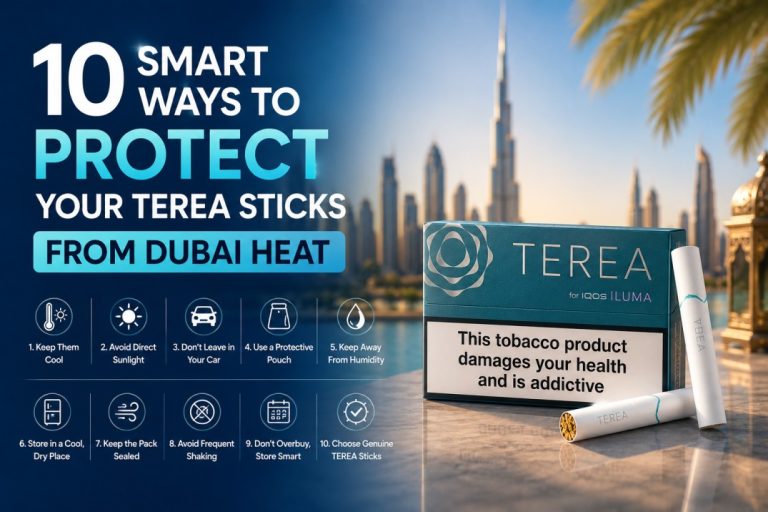
Overheating is a device issue, but the heat that causes it often starts with where you store your TEREA sticks. Sticks stored improperly in UAE summer heat dry out faster, affecting the susceptor performance and requiring the induction system to work harder to heat them. This increases per-session heat generation.
Store all TEREA packs in an air-conditioned room away from windows and direct sunlight. Never store packs in a car during UAE summer. Keep packs sealed until the moment you use them. Open packs should be used within two weeks in UAE conditions.
This applies to every TEREA flavor, from tobacco-only options like TEREA Bronze and TEREA Sienna to menthol and aromatic options like TEREA Oasis Pearl and TEREA Purple Wave.
Browse the full TEREA range by country edition at iqostereazone.ae. All packs are stored correctly before dispatch, meaning you receive fresh, properly maintained sticks that perform as expected from the first session.
Overheating Across Dubai and UAE: Where It Happens Most
Dubai
Users in Business Bay, DIFC, and Downtown Dubai most commonly report overheating from rapid session use during work breaks when they try to fit multiple sessions into a short window. The fix is always the same: longer gaps between sessions.
Dubai Marina, JBR, and Jumeirah Beach users report the most environmental heat overheating, particularly during summer when outdoor dining and waterfront sessions are common at temperatures above 40 degrees. Keeping the device shaded and allowing extra time between sessions resolves this consistently.
Deira and Bur Dubai users report the most counterfeit-stick-related overheating, where fake TEREA sticks cause the induction system to work harder. Switching to genuine sticks from iqostereazone.ae resolves this.
Mirdif, Al Barsha, and Discovery Gardens users most commonly report car storage overheating, where devices left in parked cars during work or shopping trips trigger thermal shutdowns on first use. Never leaving the device in the car is the complete prevention.
Sharjah and Ajman
Users commuting daily between Sharjah and Dubai on the Sheikh Mohammed Bin Zayed Road or Emirates Road often use their device in the car. In summer, car temperatures in traffic at midday can create conditions similar to leaving a device in a parked car. Keep the device in an air-conditioned bag or hold it in your hand rather than leaving it on the seat between sessions.
Both Sharjah and Ajman are within the 1 to 2 hour delivery window from iqostereazone.ae for fresh TEREA sticks and replacement devices.
Abu Dhabi, Fujairah and Northern Emirates
Abu Dhabi’s combination of high summer temperatures and heavy outdoor professional use creates more overheating reports than any other emirate outside Dubai. The prevention approach is identical: never leave the device in a car, take longer session breaks outdoors, and keep the device shaded.
Fujairah’s higher humidity relative to the rest of the UAE adds a secondary issue: moisture can enter the device’s vents more readily than in drier cities, compounding heat management issues. Weekly vent cleaning is particularly important for Fujairah users.
For Abu Dhabi, same-day delivery from iqostereazone.ae is available on orders placed before 1:00 PM. All other UAE emirates receive delivery within 12 hours.
When to Contact Support Instead of Self-Troubleshooting
The six-step fix plan above resolves overheating in almost every case. Contact iqostereazone.ae WhatsApp support when:
The device overheats on every single session even after fully cooling, resetting, updating firmware, and switching to a fresh genuine TEREA pack. This indicates a hardware fault, likely a degraded battery or a failing temperature sensor.
The device feels hot even when it has not been used for several hours and has been stored in a cool indoor space. Heat without use is a sign of an internal fault that requires professional inspection.
The device has been exposed to water, dropped with visible external damage, or physically deformed in any way. Do not attempt to use a physically damaged device that is also showing overheating signals.
The battery drains extremely fast alongside the overheating. Rapid drain and overheating together in a device over 18 months old typically mean battery replacement is needed.
Support is available 24 hours a day, 7 days a week via WhatsApp. For users in Dubai and Sharjah, replacement ILUMA i devices are available through iqostereazone.ae with delivery in 1 to 2 hours if a replacement turns out to be the right solution.
Why Choose iqostereazone.ae for ILUMA Devices and TEREA Sticks in Dubai
Genuine Products That Reduce Overheating Risk
One of the most preventable causes of ILUMA overheating in the UAE is counterfeit TEREA sticks. Fake sticks lack a correctly functioning susceptor, forcing the induction system to generate extra heat trying to activate a faulty element. Every TEREA stick from iqostereazone.ae is authentic, which removes this risk entirely.
1 to 2 Hour Delivery Across Dubai, Sharjah and Ajman
If your device turns out to need replacing, or if you need fresh TEREA stock quickly, iqostereazone.ae delivers all ILUMA i models and TEREA sticks across Dubai in 1 to 2 hours. Same-day delivery to Abu Dhabi on orders before 1:00 PM. Nationwide delivery within 12 hours.
All ILUMA i Models in Stock
If you need a replacement device, all three ILUMA i models are available: ILUMA i ONE, ILUMA i Standard, and ILUMA i Prime. No waiting. No back-ordering.
24/7 WhatsApp Support
Available around the clock for troubleshooting advice before you spend anything. Describe your overheating situation and get honest guidance on whether it is a usage habit, environmental, or hardware issue.
Cash on Delivery or Card Payment
Pay on arrival in cash or in advance by card. Free delivery on orders above AED 450. No subscription required.
Related Guides on IQOS Terea Zone
To get the most out of your ILUMA device in UAE conditions, these published guides cover every aspect of ownership:
- Why ILUMA i Devices Do Not Need Cleaning: Understand how Smartcore Induction works and why the no-cleaning design also means less heat-related maintenance.
- IQOS ILUMA i Not Performing Well? Here’s What to Check: Full troubleshooting guide covering all ILUMA performance problems beyond overheating.
- Ultimate ILUMA i Setup Guide for Dubai: First-time setup guide with UAE-specific device and storage tips.
- Top TEREA Flavors for UAE Users: Find the right TEREA flavor for your device and taste preferences.
Order Fresh TEREA Sticks or a Replacement ILUMA i in Dubai Today
Most overheating problems are resolved within 15 minutes using the steps in this guide. If the issue turns out to be counterfeit sticks, a fresh genuine pack from iqostereazone.ae resolves it on the first session. If the device needs replacing, all ILUMA i models are in stock and delivered to any Dubai address in 1 to 2 hours.
Shop All ILUMA i Devices in Dubai Order Genuine TEREA Sticks with 1-Hour Delivery Browse TEREA by Country Edition Chat With Our Team on WhatsApp 24/7
Frequently Asked Questions
Why does my IQOS ILUMA keep overheating during the summer in Dubai?
The IQOS ILUMA overheats in Dubai summer primarily because of ambient heat pushing the device toward its thermal limit before sessions even begin. Car interiors reach 60 to 70 degrees Celsius in UAE summer, well above the device’s 50-degree operating maximum. Combine that with the heat generated by back-to-back sessions and the device triggers its thermal protection quickly. The fix is to keep the device in a bag or shaded cool location, never leave it in a parked car, and allow 2 to 3 minutes between sessions. Moving the device to an air-conditioned space for 15 minutes fully resolves an active thermal shutdown.
What do two white blinks mean on the IQOS ILUMA?
Two white blinks followed by the device turning off is the IQOS ILUMA’s thermal protection signal. It means the internal temperature has reached or exceeded the safe operating limit and the device has shut itself off to prevent damage. This is a safety feature, not a malfunction. The device is protecting itself. Move it to a cool, air-conditioned space for 15 minutes, perform a 10-second reset by holding the pocket charger button, then test one session with a fresh TEREA stick.
Can I put my IQOS ILUMA in the fridge to cool it down faster?
No. Never place your IQOS ILUMA or any electronic device in a refrigerator or near ice to speed up cooling. The rapid temperature drop causes condensation to form on the internal electronic components. This moisture can cause short circuits or corrosion that are far more damaging than the original overheating event. The only safe cooling method is natural cool-down in an air-conditioned room at normal indoor temperature. 15 minutes is enough.
Does using menthol TEREA sticks cause more overheating than tobacco-only sticks?
Slightly. Menthol-category TEREA sticks such as TEREA Turquoise require the induction system to work marginally harder to activate both the tobacco and the menthol capsule element. This generates a small amount more heat per session compared to tobacco-only sticks like TEREA Silver or TEREA Amber. The difference is small but becomes noticeable in UAE summer conditions during back-to-back sessions. Taking an extra 60 to 90 seconds between sessions when using menthol sticks outdoors in summer is enough to prevent heat accumulation.
Where can I get a replacement IQOS ILUMA i delivered in Dubai if my device cannot be fixed?
All three IQOS ILUMA i models, including the ILUMA i ONE, ILUMA i Standard, and ILUMA i Prime, are in stock at iqostereazone.ae with 1 to 2 hour delivery across all Dubai areas, Sharjah, and Ajman. For Abu Dhabi, same-day delivery is available on orders placed before 1:00 PM. Free delivery on orders above AED 450. WhatsApp support is available 24 hours a day to help you decide whether a fix or a replacement is the right next step.
Note: For adult tobacco users only. TEREA and IQOS products contain nicotine, which is addictive. Not for sale to minors. iqostereazone.ae is an independent platform and is not affiliated with Philip Morris International or IQOS.